
Owners’ area guide
Last updated: 8 November 2026
The owners’ area is the private section of asifgrup.com where, if we manage the rental of your property, you can check your properties, each month’s statements and the summary for your tax return whenever you like. This guide explains how to sign in and what you’ll find in each section. For now the owners’ area is only available in Spanish, so buttons and sections are referred to by the Spanish names you’ll see on screen.
Who can sign in
Owners whose rental we manage, and anyone they tell us about, such as a family member or their accountant. Each person signs in with their own email address and only sees the properties we’ve given them access to.
If you don’t have access yet, or would like someone else to be able to sign in too, write to us and we’ll set it up.
How to sign in
The sign-in page is at asifgrup.com/propietarios. There are no passwords: you sign in with your email address and a one-time code.
- Enter the email address you gave us and tap “Recibir código” (get code). If you received our invitation email, its button takes you there with your email already filled in.
- We’ll instantly email you a 6-digit code.
- Type it in and you’ll be signed in without pressing anything else.
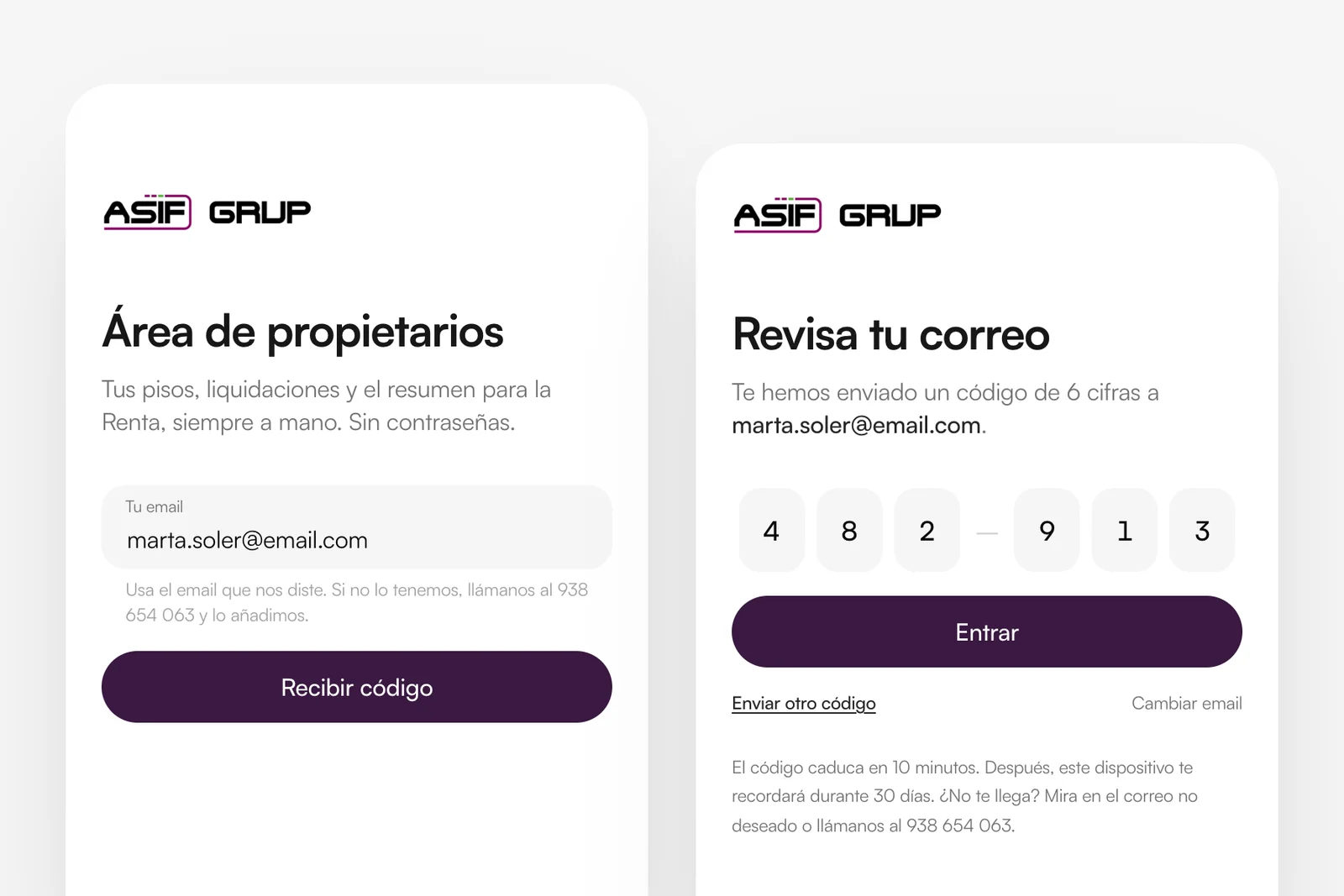
The code expires after 10 minutes. Once you’re in, that device will remember you for 30 days, so you won’t need a new code every time. If it doesn’t arrive, check your spam folder or request another one with “Enviar otro código”.
If we don’t have the email address you’re using, call us on +34 938 654 063 and we’ll add it.
Home
The home page (“Inicio”) is the first thing you see after signing in. At a glance:
- Your latest statement: the amount, when we transferred it and whether any expenses were deducted. Until it has been transferred, it shows as “Por transferir” (to be transferred).
- Your properties this month: how the current month is going for each one.
- Coming up (“Próximamente”): rent updates due in the next three months and, from January to June, a notice that your tax summary is ready.
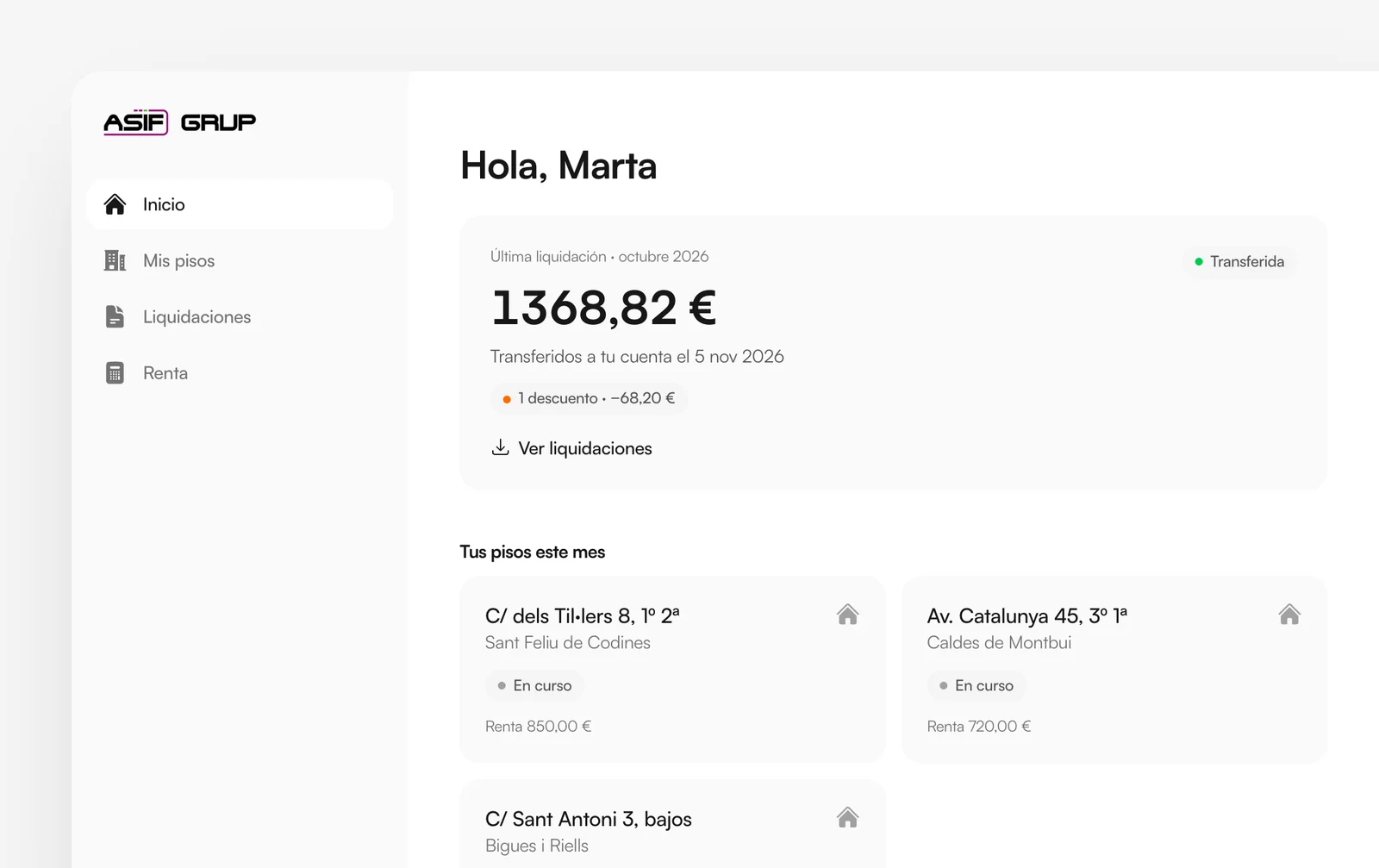
Each month of each property has a status:
- En curso
- In progress: the month isn’t over yet.
- Pendiente de liquidar
- Pending: the month is over and we haven’t transferred the amount yet.
- Liquidado
- Settled: we’ve transferred the amount to you.
- Sin alquilar
- Not let: the property had no tenant for the whole month, so there is no rent to settle.
The “Próximamente” notices are still being tested: dates and amounts are approximate. At the bottom of the home page you’ll also find the latest housing news.
My properties
The “Mis pisos” section lists every property we manage for you. Open one to see its details:
- Contract: tenants, monthly rent, start and end dates, deposit and the index used to update the rent (CPI, IRAV or an agreed percentage). “Ver contrato” downloads the contract as a PDF.
- Next update: when the rent will be updated and, if the index has already been published, the new amount. We calculate it and notify the tenant in writing, as the law requires.
- The property: cadastral reference, floor area, certificate of occupancy (cédula de habitabilidad) and layout.
- Month by month: the status of recent months, with a note when something happens, such as a change of tenant.
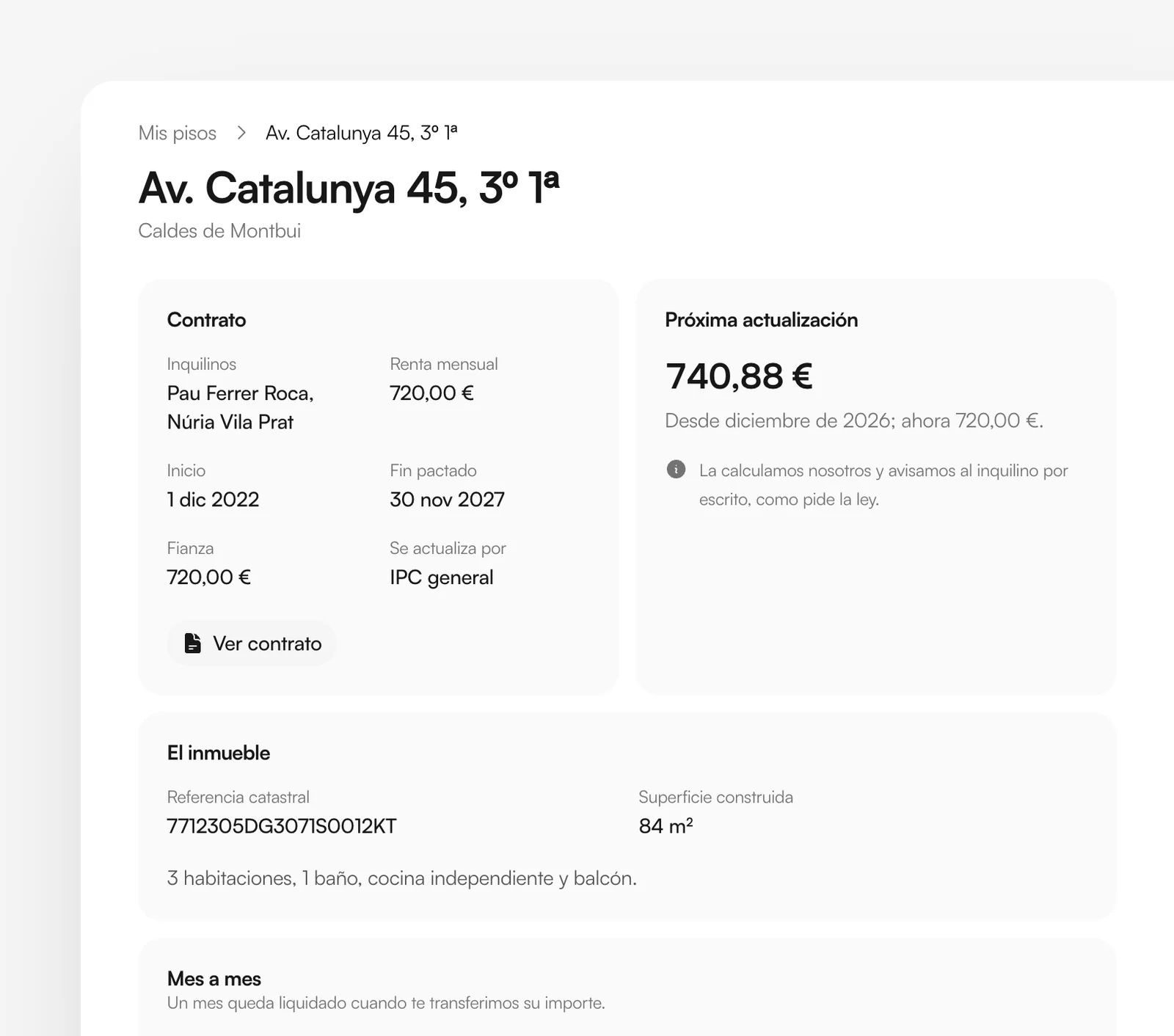
If the contract isn’t on the platform yet, the page will say so; ask us for a copy and we’ll send it to you.
Statements
Each month, once we collect the rent, we transfer the amount to you after deducting our management fee and any property expenses. Each transfer comes with a statement (“liquidación”), which you can download as a PDF with the arrow on the right.
If anything was deducted in a statement, it’s listed underneath with its type:
- Gasto
- Expense: a supplier’s invoice, such as a plumber, the community of owners or property tax (IBI). Download the invoice with “Factura”.
- Honorarios
- Fees: ours for finding a tenant, with the invoice we issued to you.
- Descuento
- Deduction: an amount that isn’t an expense, such as rent you collected in cash yourself.
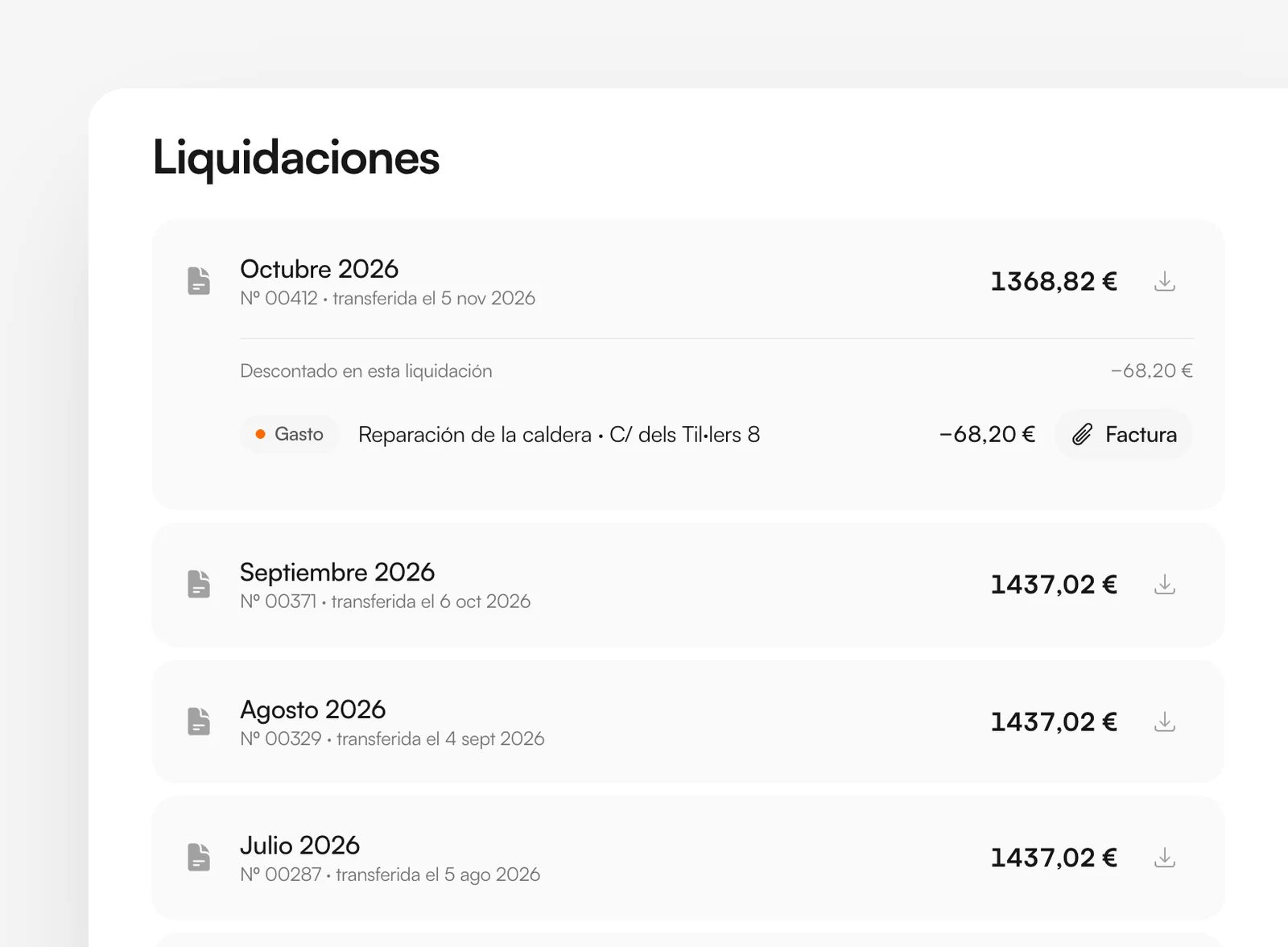
Below them you’ll also find the invoices we’ve issued to you, for example for finding a tenant.
You’ll find the statements issued through the platform from 2026 onwards. If you need an earlier one, ask us and we’ll send it.
Tax return summary
The “Renta” section gathers, year by year, what you need to declare your rental income for Spanish personal income tax (IRPF):
- Rental income.
- Our management fees and the VAT on them.
- Repairs and other expenses that went through us.
- The resulting net income and, if we withheld tax, the amount withheld.
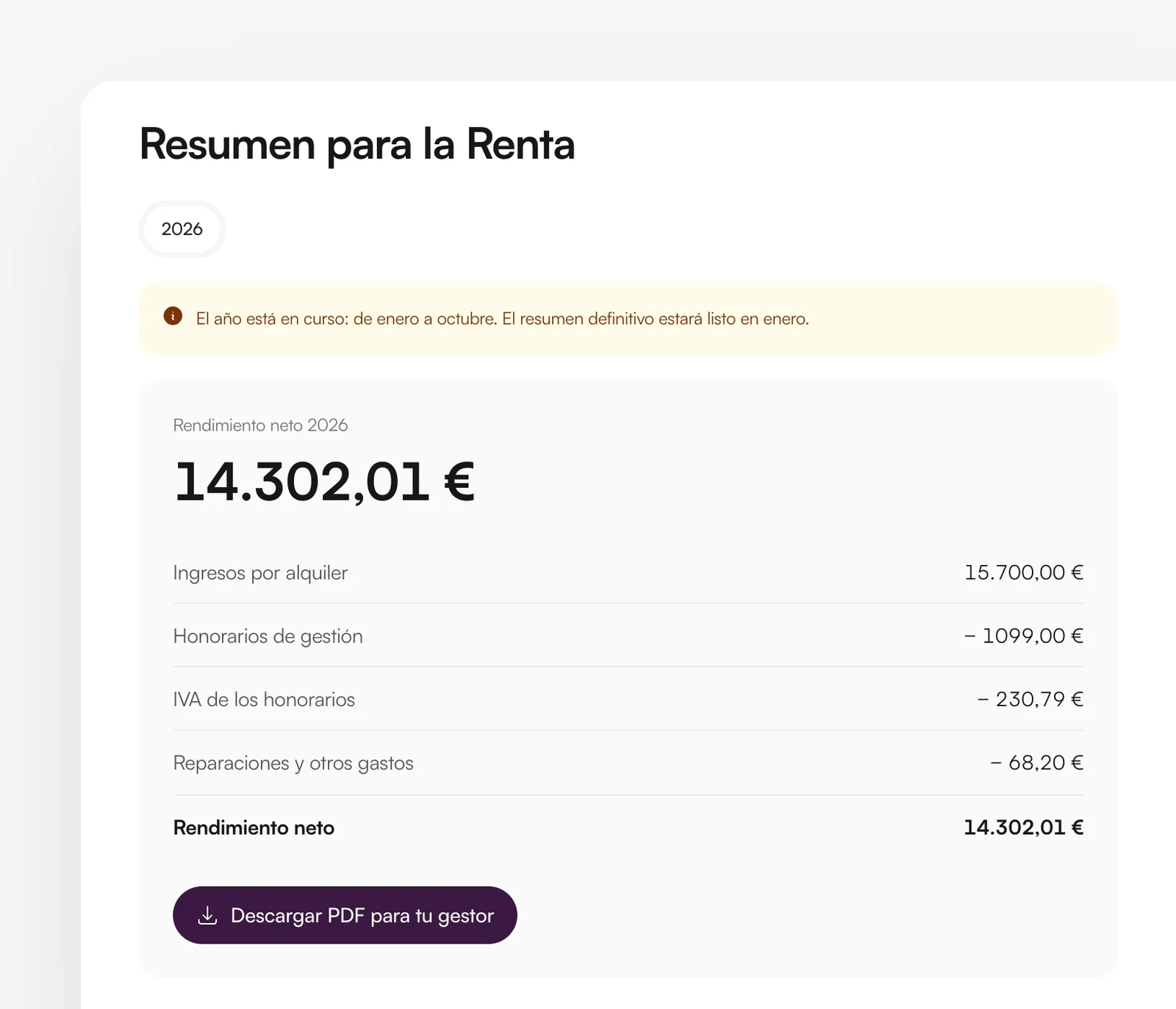
“Descargar PDF para tu gestor” gives you a PDF ready to send to whoever prepares your tax return. While the year is still in progress the summary is provisional; the final one will be ready in January.
It only includes what goes through us. Property tax (IBI), insurance or community fees that you pay directly need to be added to your return yourself.
If you own properties both personally and through a company, you’ll see a separate summary for each holder, as each one files separately.
If you look after several owners’ properties
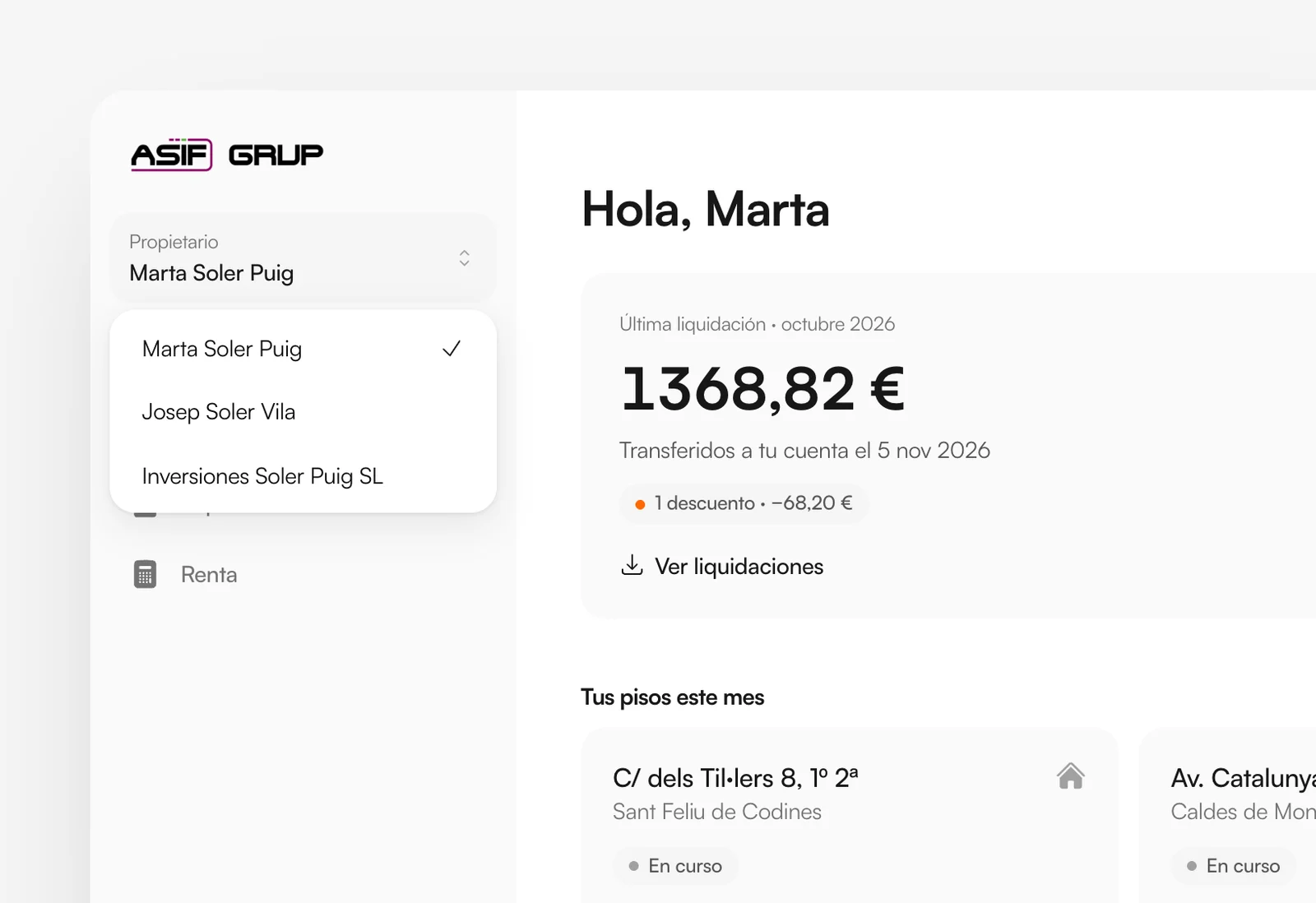
If you look after several people’s properties with the same email address (your parents’, for example, or your clients’ if you’re an accountant), you’ll see a “Propietario” (owner) selector at the top of the menu. You see one owner at a time, as if they had signed in themselves, and switch between them from there. On a phone, the selector is at the top of the page.
When a property has several owners, the statement is always issued in the name of the property’s owner. If you are a co-owner, you may see it in your area marked “A nombre de…” (in the name of); if not, we’ll tell you whose name it’s in.
On your phone
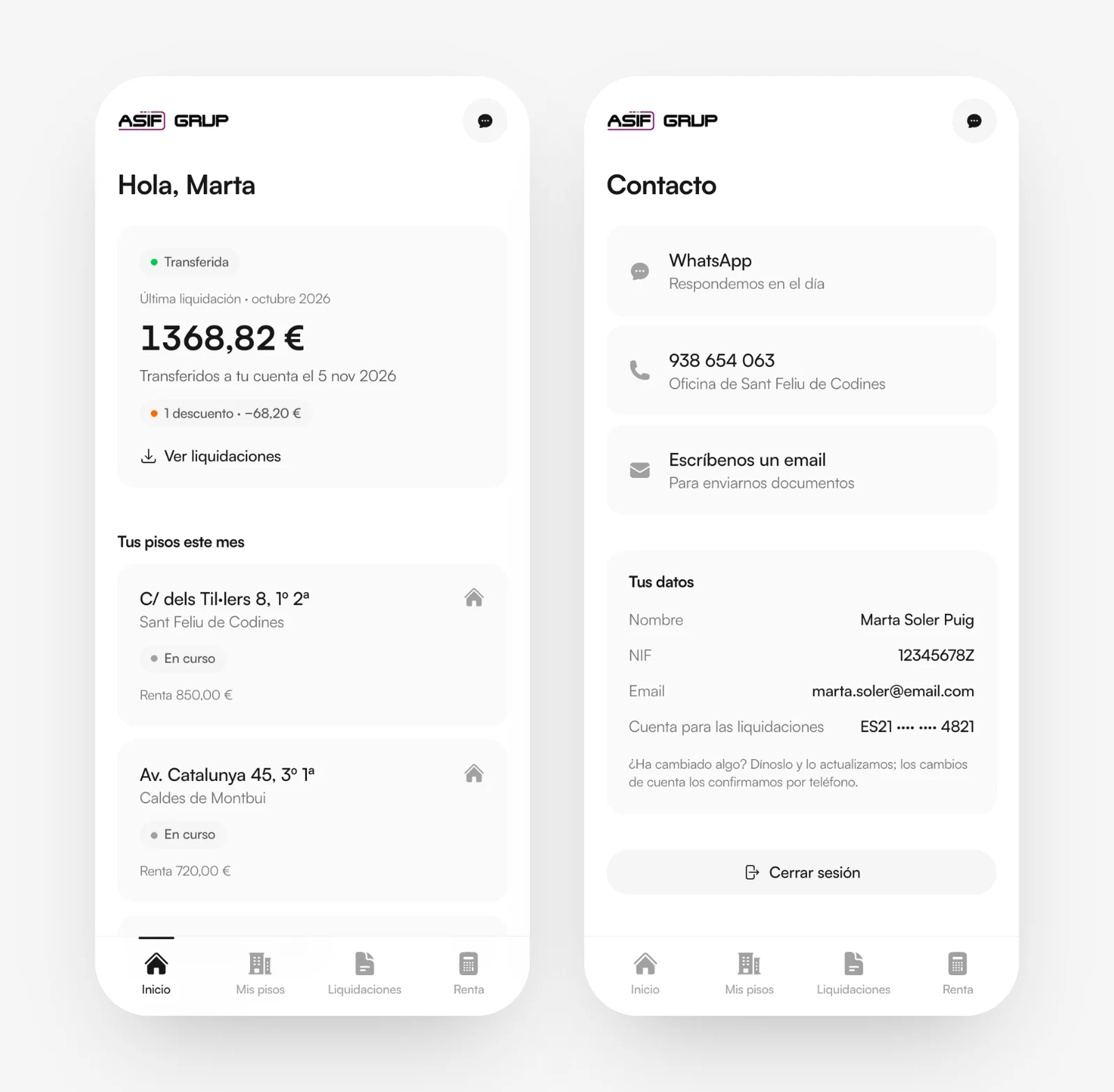
The owners’ area is designed for phones too. At the bottom you’ll find the Inicio, Mis pisos, Liquidaciones and Renta tabs; at the top right, the contact button.
Contact and your details
The “Contacto” page lists our channels: WhatsApp, where we reply the same day; the office phone; and email, which is the best way to send us documents.
It also shows the details we hold about you: name, tax ID (NIF), email address and the account we transfer your statements to, with only the last digits visible. If anything has changed, let us know and we’ll update it. For your security, we always confirm bank account changes by phone.
Security
- Each person signs in with their own email address and only sees what concerns them.
- Don’t share your code with anyone. We will never ask you for it.
- If you sign in on a shared computer, sign out when you’re done with “Salir” in the side menu. On a phone, “Cerrar sesión” is on the “Contacto” page.
- To protect your account, we log sign-ins and downloads.
How we handle your data in the owners’ area is explained in our privacy policy.
Frequently asked questions
Check your spam folder and make sure you’re using the same email address you gave us. If it still doesn’t arrive, call us on +34 938 654 063.